JavaScript Arrays 101
Software Engineer | Passionate about Web Development, DSA & Problem Solving. I write simple, practical tech blogs to help developers learn and grow. Exploring JavaScript, C++, Backend & Modern Web Technologies.
Introduction
When you begin learning JavaScript, one common challenge is handling multiple related values at the same time.
For example, you may want to store:
A list of tasks for the day
Marks of students
Names of your favorite movies
If you try to store each value in a separate variable, the code quickly becomes long, confusing, and difficult to manage.
To solve this problem, JavaScript provides a powerful and simple data structure called an array.
In this article, we will understand arrays from scratch using clear explanations and simple examples.
What Are Arrays and Why Do We Need Them?
An array is a collection of values stored together in a specific order under a single variable name.
Problem Without Arrays
let note1 = "Read book";
let note2 = "Complete homework";
let note3 = "Practice JavaScript";
let note4 = "Go for a walk";
Issues with this approach:
Too many variables
Hard to manage related data
Looping becomes difficult
Solution Using an Array
let notes = ["Read book", "Complete homework", "Practice JavaScript", "Go for a walk"];
Now:
All related values are grouped
Code is cleaner
Easy to process using loops
This is why arrays are used in almost every real-world program.
How to Create an Array
In JavaScript, arrays are created using square brackets[].
Example: Storing Study Subjects
let subjects = ["Math", "Physics", "Chemistry", "English"];
Here:
subjects is the array name
Each item inside is called an element
Elements are separated by commas
Arrays allow us to store multiple values in a single variable efficiently.
Accessing Elements Using Index
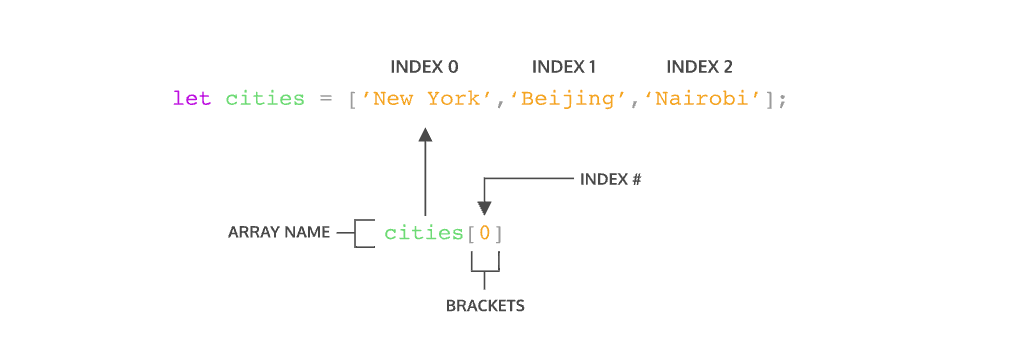
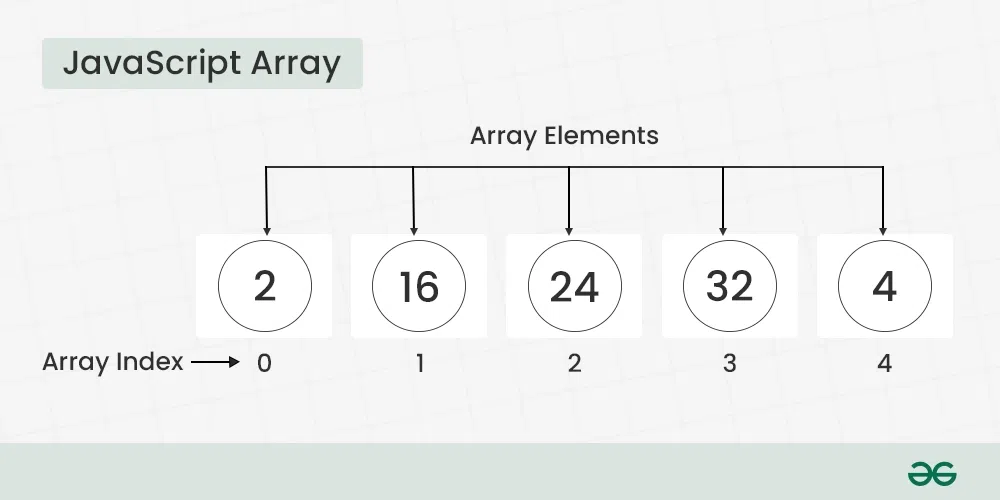
Each element in an array has a position called an index.
Important rule to remember:
Array indexing starts from 0, not 1.
Example
let cities = ["New York", "Beijing", "Nairobi", "Kolkata"];
cities[0] → New York
cities[1] →Beijing
cities[2] → Nairobi
console.log(cities[0]);
console.log(cities[2]);
Updating Elements in an Array
Array values can be changed using their index number.
Example
let devices = ["Phone", "Laptop", "Tablet"];
devices[2] = "Smart Watch";

console.log(devices);
Output:
["Phone", "Laptop", "Smart Watch"]
Here, the value at index 2 was updated without creating a new array.
Array Length Property
The length property tells us how many elements an array contains.
Example
let players = ["Rohit", "Virat", "Gill", "Rahul"];

console.log(players.length);
Output:
4
Finding the Last Element
console.log(players[players.length - 1]);
This method is very useful when the array size is unknown.
Basic Looping Over Arrays
To work with each element of an array, we use a for loop.
Example: Printing a To-Do List
let todo = ["Wake up", "Study", "Practice coding", "Sleep"];

for (let i = 0; i < todo.length; i++) {
  console.log(todo[i]);
}
This loop:
Starts from index 0
Runs till the last element
Prints each value one by one
Conclusion
Arrays are one of the most important building blocks in JavaScript.
They help you store, manage, and process multiple values efficiently.
Once you understand arrays clearly, learning advanced topics like objects, functions, and real-world projects becomes much easier.
If you can control arrays, you can control data — and data is the heart of programming.


