Map and Set in JavaScript

Software Engineer | Passionate about Web Development, DSA & Problem Solving. I write simple, practical tech blogs to help developers learn and grow. Exploring JavaScript, C++, Backend & Modern Web Technologies.
Introduction
JavaScript provides powerful built-in data structures for handling collections of data. While developers traditionally used Objects and Arrays, modern JavaScript (ES6+) introduced Map and Set to solve specific limitations and improve performance and usability.
Map is designed for efficient key-value storage
Set is designed for storing unique values
Understanding when and why to use Map and Set is essential for writing clean, optimized, and scalable JavaScript code.
1. What Map is
A Map is a collection of key-value pairs where keys can be of any data type (unlike objects, which only allow strings or symbols as keys).
Example:
const map = new Map();

map.set("name", "Peeyush");
map.set(1, "Number key");
map.set(true, "Boolean key");

console.log(map.get("name"));
Explanation :
map.set(key, value)is used to add entriesKeys can be strings, numbers, or even booleans
map.get("name")retrieves the value"Peeyush"
Output:
Peeyush
Unlike objects, Map does not restrict key types.

2. What Set is
A Set is a collection of unique values, meaning it automatically removes duplicates.
Example:
const set = new Set([1, 2, 2, 3, 4, 4]);

console.log(set);
Explanation :
Duplicate values (
2,4) are removed automaticallyOnly unique values are stored
Output:
Set {1, 2, 3, 4}
This makes Set very useful when you need to ensure uniqueness.
3. Difference Between Map and Object
Although both Map and Object store key-value pairs, they behave differently.
Example:
const obj = {};
obj[1] = "One";
obj["1"] = "String One";

console.log(obj);
Explanation:
Object converts keys to strings
1and"1"become the same keyData may get overwritten
Output:
{ "1": "String One" }
Map Version:
const map = new Map();

map.set(1, "One");
map.set("1", "String One");

console.log(map);
Explanation:
Map keeps key types separate
1and"1"are treated differentlyNo data loss
Key Differences:
| Feature | Map | Object |
|---|---|---|
| Key Types | Any type | String/Symbol only |
| Order | Maintained | Not guaranteed |
| Size | .size property |
No direct method |
| Iteration | Easy | Requires methods |
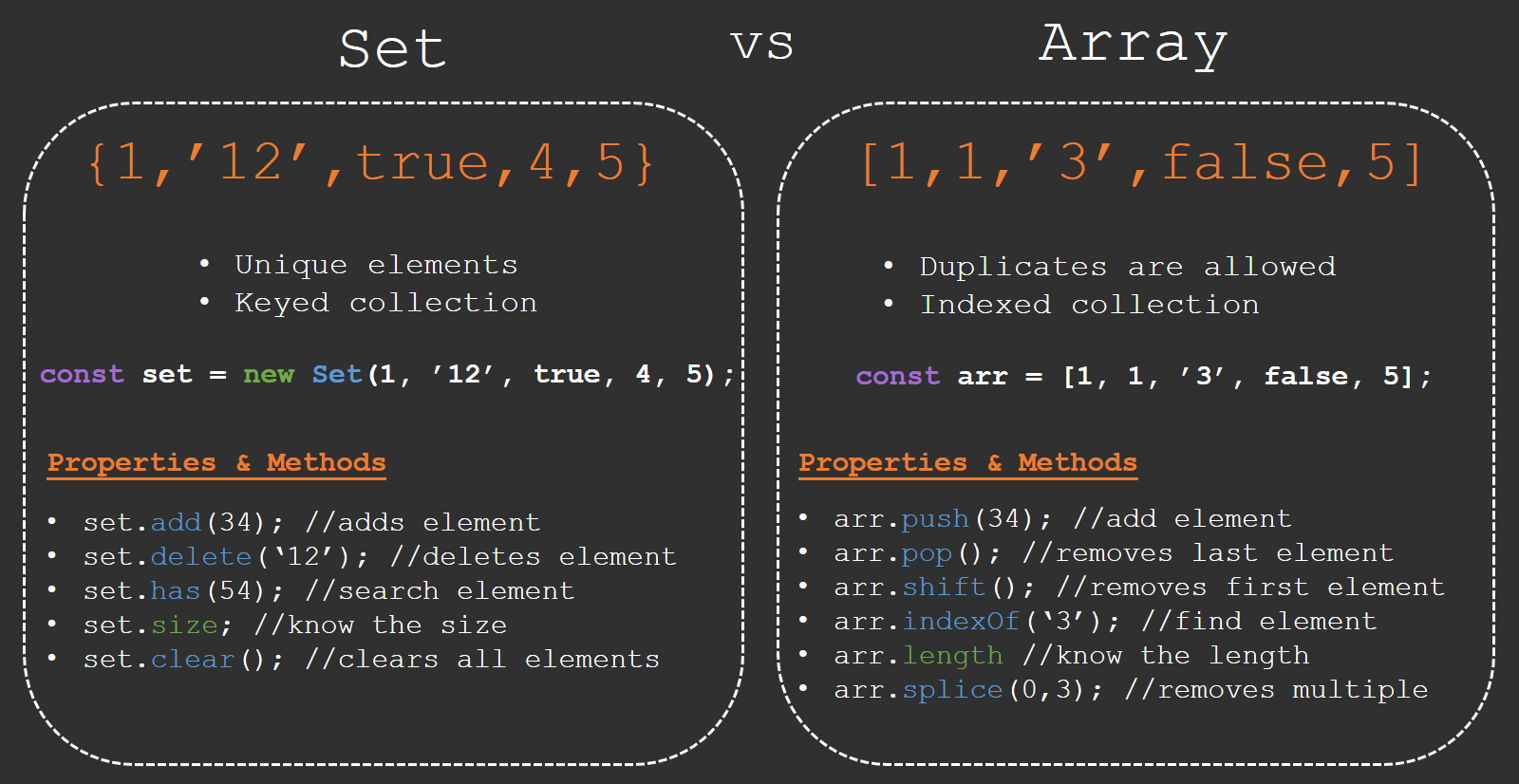
4. Difference Between Set and Array
Arrays can store duplicate values, while Sets cannot.
Example (Array):
const arr = [1, 2, 2, 3];
console.log(arr);
Explanation:
Array allows duplicates
Output remains unchanged
Output:
[1, 2, 2, 3]
Example (Set):
const set = new Set([1, 2, 2, 3]);
console.log([...set]);
Explanation:
Set removes duplicates
Spread operator converts it back to array
Output:
[1, 2, 3]
Key Differences:
| Feature | Set | Array |
|---|---|---|
| Duplicates | Not allowed | Allowed |
| Order | Maintained | Maintained |
| Indexing | No | Yes |
| Use Case | Unique data | Ordered list |
5. Problems with Traditional Objects and Arrays
Before Map and Set, developers relied on Objects and Arrays, which had limitations:
Object Problems:
Keys are always converted to strings
No guaranteed insertion order (older behavior)
Difficult to iterate
Array Problems:
Allows duplicate values
Searching and uniqueness checks are inefficient
Example (Duplicate Removal Problem):
const arr = [1, 2, 2, 3, 3];

const unique = arr.filter((item, index) => arr.indexOf(item) === index);

console.log(unique);
Explanation:
Manual logic required to remove duplicates
Less efficient and more complex
Output:
[1, 2, 3]
Set solves this problem easily.
6. When to Use Map and Set
Use Map when:
You need key-value pairs
Keys are not just strings
Frequent additions/removals
Order matters
Example:
const userRoles = new Map();

userRoles.set("admin", "Full Access");
userRoles.set("user", "Limited Access");

console.log(userRoles.get("admin"));
Explanation:
Efficient key-value management
Easy retrieval using
.get()
Use Set when:
You need unique values
Removing duplicates
Fast lookups
Example:
const ids = [1, 2, 2, 3, 4];

const uniqueIds = new Set(ids);

console.log(uniqueIds);
Explanation:
Automatically removes duplicates
Simple and efficient
Conclusion
Map and Set are powerful additions to JavaScript that solve many limitations of traditional Objects and Arrays.
Map provides flexible and efficient key-value storage
Set ensures uniqueness and simplifies data handling
By understanding their differences and use cases, you can write:
Cleaner code
More efficient logic
Better structured applications