Understanding the this Keyword in JavaScript
Software Engineer | Passionate about Web Development, DSA & Problem Solving. I write simple, practical tech blogs to help developers learn and grow. Exploring JavaScript, C++, Backend & Modern Web Technologies.
Introduction
The this keyword is one of the most important—and often confusing—concepts in JavaScript. Many developers struggle with it because its value is not fixed. Instead, this depends on how a function is called, not where it is defined.
A simple way to understand this is:
thisrefers to the object that is calling the function
Understanding this concept will help you write better object-oriented code and avoid common bugs.
1. What this Represents
The value of this is determined by the calling context of a function.
Example:
function show() {
    console.log(this);
}

show();
Explanation:
The function is called directly (no object)
In browsers,
thisrefers to the global object (window)In strict mode, it becomes
undefined
So this depends on who is calling the function.
2. this in Global Context
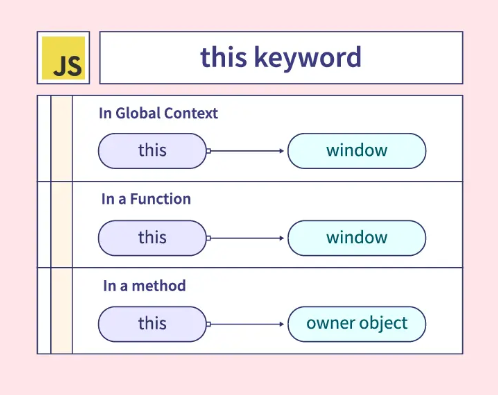
In the global scope, this refers to the global object.
Example:
console.log(this);
Explanation of Example:
In browsers →
thisiswindowIn Node.js →
thisis different (module scope)
This shows that environment also affects this.
3. this Inside Objects
When a function is called as a method of an object, this refers to that object.
Example:
const user = {
    name: "Peeyush",
    greet: function() {
        console.log(this.name);
    }
};

user.greet();
Explanation :
greet()is called usinguserSo
thisrefers touserthis.namebecomes"Peeyush"
Output:
Peeyush
This is the most common and easiest case.
4. this Inside Functions
Inside a normal function, this depends on how the function is called.
Example:
function test() {
    console.log(this);
}

test();
Explanation :
Function is called directly
In non-strict mode →
this = windowIn strict mode →
this = undefined
Example (Strict Mode):
"use strict";

function test() {
    console.log(this);
}

test();
Explanation:
Strict mode changes behavior
Prevents accidental use of global object
Safer for development
5. How Calling Context Changes this
The most important rule:
thisdepends on how a function is called, not where it is defined
Example:
const person = {
    name: "Rahul",
    show: function() {
        console.log(this.name);
    }
};

const another = {
    name: "Aman"
};

another.show = person.show;

another.show();
Explanation :
show()was originally inpersonBut now it is called using
anotherSo
thisrefers toanother
Output:
Aman
This proves that caller determines this.
6. Common Mistake with this
Example:
const user = {
    name: "Peeyush",
    greet: function() {
        function inner() {
            console.log(this.name);
        }
        inner();
    }
};

user.greet();
Explanation :
inner()is a normal functionIt is not called by
userSo
thisbecomes global (or undefined in strict mode)
Output:
undefined
This is a common confusion.
Solution (Arrow Function):
const user = {
    name: "Peeyush",
    greet: function() {
        const inner = () => {
            console.log(this.name);
        };
        inner();
    }
};

user.greet();
Explanation:
Arrow functions do not have their own
thisThey inherit
thisfrom the parent scopeSo
thiscorrectly refers touser
Output:
Peeyush
7. Summary of this in Different Contexts
| Context | Value of this |
|---|---|
| Global scope | Global object |
| Object method | The object |
| Regular function | Global / undefined |
| Arrow function | Inherited from parent |
Conclusion
The this keyword is dynamic and depends entirely on how a function is invoked.
By understanding:
Caller context
Object methods
Function behavior
Arrow functions
You can avoid common mistakes and write more predictable JavaScript code.


